 Baobi
BaobiYour whole business fits in your pocket.
Shops, online and Baobi marketplace sales, deliveries, stock, purchases, expenses, your money: Baobi runs your whole business. One app, by your side every day.



One Baobi, on the phone and on the computer.
On a computer, the same app, full size: the same buttons, the same gestures, the “All” icons in a column on the left. The “Odoo” button opens the full space for accounting and settings.

- Till and receipts
- Online shop, orders
- Stock, purchases, customers
- Wave, Orange Money, vaults
No computer needed.
- Accounting, financial statements
- Payroll and returns
- Contracts, leave, HR files
- Imports, large catalogues
In the browser, nothing to install.
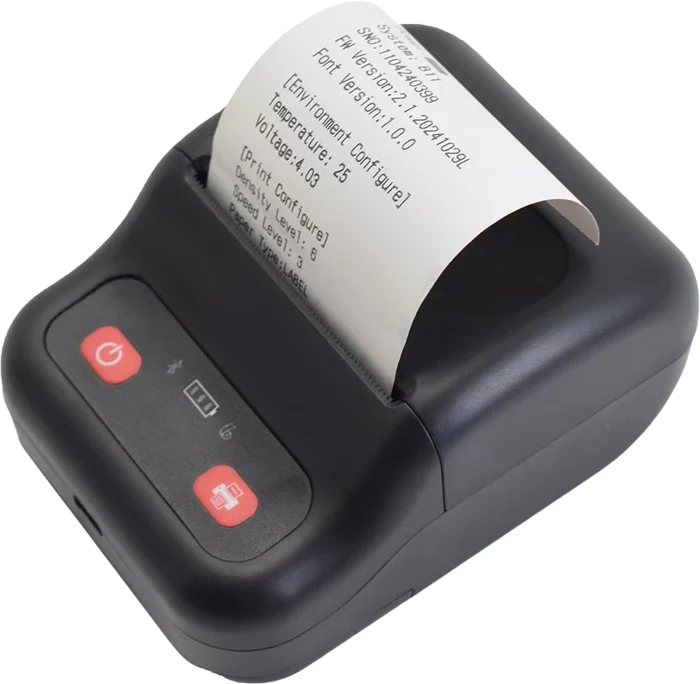
The phone prints receipts over Bluetooth.
A small wireless thermal printer on the counter: the receipt comes out as you take payment. No computer, no cable. An Android PDA with a built-in printer works too, and the receipt can always go out on WhatsApp.
Easily manage the publication of your products, your sales and your payments.
A fictional shop, Khady Mèches, open in the app. Nothing is saved, no message is sent.
Tutorials: Baobi shows how
In the language and colour chosen. Tap the screen to pause.
French voice for now: the tutorial switches the screen to French.
Guided tour: tap a screen
Three rows of icons that scroll: till, products, orders and customers first. Everyone arranges their icons as they like.
Open the demo full screen ↗ · French, English or Wolof, at any time, from the app's menu.
Tutorials: Baobi shows where to tap, and says it.
Each tutorial plays the real app, in a demonstration shop: nothing is created or changed in yours.


The finger points, a halo lights it up, the voice explains.
Tap the screen to pause; a button goes back one step.
In All › My settings › My tutorials, to watch a forgotten feature again.
Sell in your shop in 3 taps.
Pictures make the till. “Other sale” for an item outside the catalogue.

Cash, Wave, Orange Money, on credit or on delivery; in one go or in several parts.

WhatsApp, Bluetooth printer, Android PDA or PDF invoice.
Logo, message, 58 or 80 mm, the shop's QR code.
−10 %, −20 % until a date: till and website follow.
The delivery fee on the receipt; a deposit, then the rest on delivery or on the customer's account.
Each payment is read out loud, if you want.
Your customer buys online in 4 steps.

On your website, from their phone: pictures, prices, basket.

Their basket, name, number and delivery zone.

The order lands in “My orders”: to prepare, to deliver, delivered.

To the rider, on delivery: the sale is cashed in the app.
A product online: a photo, a price, a stock.
One catalogue serves the till and the website. No form: the assistant reads the photo and suggests the name, the category and a description.

Taken with the phone, kept as is or cut out.

Name, category and description suggested: keep them or change them.

In the till and on the site; the link is shared on WhatsApp.
Your online shop, built from a few questions
Pick a style: the site is created with your products, the text for Google, the “Get a quote” button and ordering on WhatsApp. Several sites, duplicated or removed in one tap.


One per activity or range, each with its own style.
Title and description for Google, written for you.
The customer writes, you answer with the quote ready.
Wave, Orange Money, credit and vaults: all the money in one place.
No bank account needed: the shop runs on mobile money.


Each payment method has its button and its journal.
Part paid today, the rest when the customer comes back; the WhatsApp reminder.
Rent, stock, electricity: a short questionnaire, then regular transfers.
What will come in, what will be due, the low point.
During the beta, Wave, Orange Money payments and vaults are simulated: no money moves.
Stock watches itself, customers come back.


Stock is entered with the product and drops with each sale.
Products to buy again are ticked; one order per supplier, sent on WhatsApp or by e-mail, then received into stock.
Loyal, buyers, interested: each one tap away on WhatsApp.
A new product or a promo shared with past customers.
A management assistant, not a data-entry tool.
It prepares, checks, learns and suggests. You approve in one tap, and anything can be undone in one tap.

“3 oils for Fatou, paid by Wave”: the sale is ready.

A purchase price is missing, a payment is misfiled: it spots it and proposes the fix.
Remind, restock, set aside, run a promo: the essentials every morning.

It learns your habits and offers to do them for you.
The till and the online shop are ready from the start: nothing to set up.
Earned today, margin, to collect, to pay.
200 F included per month; the balance shows in the app and tops up with Wave.
No forced field: the assistant fills in, you decide.
No need for e-mail or a bank account.
Customers and suppliers write to you on WhatsApp. For quotes and invoices, every Baobi user gets a personal email address and a mailbox.


Receipts, reminders, supplier orders, announcements: everything goes out on WhatsApp.
For every user: firstname@your-shop.baobi.app, with a 200 MB mailbox, to send quotes and receive invoices.
Invoice, quote, purchase order: sent or printed in one tap.
Android PDA with printer, or a phone with a Bluetooth printer.
The power of Odoo Community, with an ultra-simple, intelligent interface.
Under the app, each space is a real Odoo 19 Community database: sales, point of sale, stock, purchases, eCommerce, invoicing. Senedoo, an Odoo Silver partner, hosts it and adds its own modules.
A growing SME moves to Odoo Enterprise with its data: why it is the best choice for an SME →
Phone, PDA or computer · big icons, little text, voice
Scenarios, self-check, suggestions, learning
WhatsApp · Wave · Orange Money · personal email and mailbox · printing
Sales · Point of Sale · Inventory · Purchase · eCommerce · Invoicing
Hosted by Senedoo · one database per space · your data can be exported
Free during the beta. Unbeatable after.
The beta has no end date: it ends when users are satisfied. In return, tell us what bothers you or what is missing.
every feature, no commitment
- Till, stock, purchases, online shop
- AI assistant, documents
- A personal email and a mailbox per user
- A phone is enough
per month, per account and per employee
- The whole business, every app
- 200 F of AI assistant included each month
- Personal email and 200 MB mailbox per user, 1 GB database included
per employee per month, after the beta
- Senegalese payslips, 29 agreements
- Payroll ledger, CSS-IPRES, DGID
Payroll and accounting: Senegal only for now. More quota (assistant, mailbox, database): 500 F or 1,000 F, by Wave.
More than 10 people? Odoo Enterprise, with Senedoo.
From 1 to 4 people, Baobi is enough. From 5 to 10, it depends on your needs. Beyond that, Odoo Enterprise and a project led by Senedoo, an Odoo Silver partner.
What people ask us.
Do I need a computer?
Not to sell: the app opens in the phone's browser and is added to the home screen, without an app store, and receipts print over Bluetooth. On a computer it is the same app, full size; for accounting and some HR modules, the “Odoo” button opens the full space.
How do I learn to use it?
With the app's tutorials, in All › My settings › My tutorials: a finger shows where to tap, a voice explains. You can also watch them here, in the demo.
In which languages?
French, English and Wolof, to change at any time in the settings, with seven screen colours to choose from.
Is it really Odoo?
Yes: each space is an Odoo 19 Community database hosted by Senedoo. The app is its simplified interface.
What hardware for receipts?
An Android PDA with a built-in printer, or a phone with a Bluetooth printer. The receipt can also go out on WhatsApp.
When does the beta end?
When users are satisfied: there is no date. You will be told before anything becomes paid.
I run an SME.
For an SME, Odoo Enterprise remains the best choice: every app and a project led by Senedoo, an Odoo Silver partner.
Your shop in your phone, in 2 minutes.
Free during the beta, in exchange for your feedback.